POK Platform
Public credential search: your own lookup, so anyone can confirm a degree without writing to your registrar's office
Whoever receives a résumé almost never has the credential's link or QR code at hand. They have a name and, with luck, an ID number. The credential lookup from POK - Proof of Knowledge closes that gap: your institution publishes a search over the credentials it issued, the person enters whichever detail your institution enabled, and right there they see whether the credential exists, what it certifies, when it was issued and whether it is still valid.
The search goes in two places, and you can turn on one or both: a search section inside your organization page on POK, and an iframe on your own website, so the whole thing is resolved without anyone having to leave your institution's domain.
Until now, confirming a degree without that link left two options. Writing to the registrar's office and waiting, which costs your team hours on every request. Or paying an outside verification service, which charges to confirm something your institution already knows and still takes days to answer.
The search goes in two places, and you can turn on one or both: a search section inside your organization page on POK, and an iframe on your own website, so the whole thing is resolved without anyone having to leave your institution's domain.
Until now, confirming a degree without that link left two options. Writing to the registrar's office and waiting, which costs your team hours on every request. Or paying an outside verification service, which charges to confirm something your institution already knows and still takes days to answer.
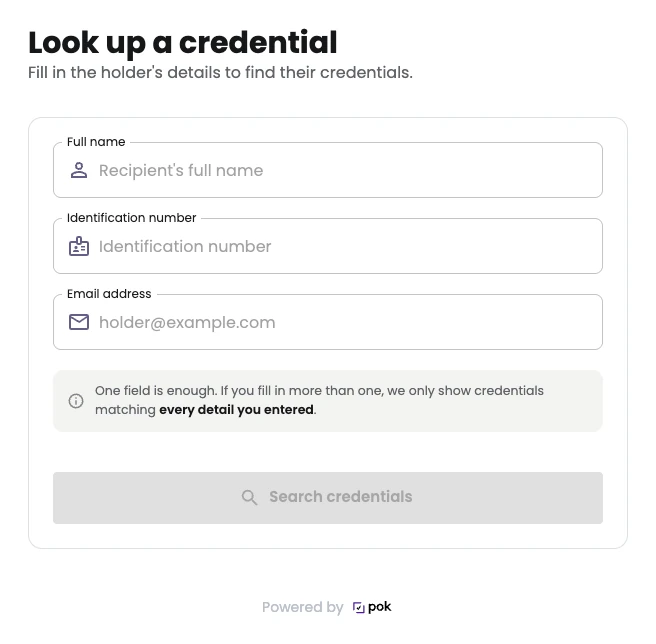
How the credential lookup works
- Two channels, independent of each other: the search section on your organization page on POK, and the iframe for your site. Publish one, the other or both, and switch them off whenever you want.
- You choose what people can search by: the holder's first and last name, ID number or email address. Enable the fields that make sense for your institution, and at least one has to stay on.
- The match is exact: the detail has to match what the credential records. This is not a fuzzy search, so nobody can type stray letters to walk through your catalog.
- If more than one field is filled in, all of them have to match. That is what settles namesakes, which at a large institution are the rule rather than the exception.
- What each result carries: the credential's title, the issue date, the expiration date if it has one, and the status, valid or expired. Plus whichever fields you decided to show: holder name, ID number, email and the link to the full credential.
- Revoking a credential takes it out of the search: a revoked credential stops appearing in the lookup, so the search never hands back something your institution withdrew.
- Only what is public: the search reaches only the credentials their holders marked as public from their own account, and only the ones issued with POK. A credential its holder keeps private is not found by any criterion.
- With bot protection: every search passes an automatic challenge before it reaches any data, and there is a cap on results per query. It is a public search, not an open endpoint for bulk extraction.
- Nothing is published until you save: the configuration includes a statement of responsibility over the data that ends up in the open, and without it the search does not go live.
What changes for your institution
The registrar's office stops being the front desk
Every employer who writes in to confirm a degree occupies someone on your team: pull the record, write the reply, file the request. With the lookup published, that back and forth resolves itself, and your team stops standing between a graduate and their next job.Verification happens on your domain, not on a vendor's
The iframe goes on whichever page you choose and works only on the domains you authorize, up to twenty. To the person searching, the lookup is one more part of your site, with your address in the browser bar. That is a substantive difference from the public directories other platforms host, where verification ends on the vendor's brand instead of yours.You publish a search, not a list of graduates
There is no index to browse, no linked result pages, and results are not indexed by search engines. Reaching a credential takes knowing that person's exact detail up front, and that person having made it public. That is what makes it possible to offer an open lookup without publishing a database of your graduates.You decide what stays visible
The sensible minimum is title, date and status, which is already enough to confirm a credential is real. Showing the ID number or the email address is a separate decision, taken field by field and reversible whenever you want. On saving, the configuration asks for an explicit statement of responsibility over the personal data being exposed, in line with what the GDPR expects of a data controller.It works with what you already issued
Nothing has to be reissued or migrated. The credentials your institution already issued with POK show up in the lookup as soon as their holders have them public.The question your team answers today can answer itself
A degree that can only be confirmed by internal email depends on someone being available to confirm it. Publishing the lookup turns that errand into something that happens without anyone stepping in, under the rules your institution set and on the page your institution controls.
POK - Proof of Knowledge holds 1EdTech's data privacy certification, runs on ISO 27001 and SOC 2 certified infrastructure, and today backs more than 1.5 million credentials from over 1,100 institutions in 19 countries. The credential lookup is a premium feature, enabled per organization.
If you want to see it working with your own credentials, look through the plans and ask for a demo. And if the other path interests you, the one where someone does arrive with the link or the QR code in hand, start with digital credential verification.
POK - Proof of Knowledge holds 1EdTech's data privacy certification, runs on ISO 27001 and SOC 2 certified infrastructure, and today backs more than 1.5 million credentials from over 1,100 institutions in 19 countries. The credential lookup is a premium feature, enabled per organization.
If you want to see it working with your own credentials, look through the plans and ask for a demo. And if the other path interests you, the one where someone does arrive with the link or the QR code in hand, start with digital credential verification.
Frequently asked questions
If the institution that issued it published its credential lookup, you search by the person's details instead of the link.
The search can live in two places, depending on what the institution turned on: on its organization page on POK, and on its own website, embedded as an iframe. In both cases you fill in whichever detail the institution enabled, which can be the holder's first and last name, their ID number or their email address, and the result comes back right away.
Every result shows the credential's title, the issue date, the expiration date if it has one, and the status: valid or expired. A revoked credential does not appear at all, because revoking it takes it out of the lookup. If the institution also chose to show it, the link to the full credential appears, which is the same verification page the link and the QR code lead to.
Two things to keep in mind. The detail has to match exactly, because the search is not fuzzy. And only credentials their holder marked as public show up: if someone keeps theirs private, it cannot be found through the search and you have to ask them for the link.
The search can live in two places, depending on what the institution turned on: on its organization page on POK, and on its own website, embedded as an iframe. In both cases you fill in whichever detail the institution enabled, which can be the holder's first and last name, their ID number or their email address, and the result comes back right away.
Every result shows the credential's title, the issue date, the expiration date if it has one, and the status: valid or expired. A revoked credential does not appear at all, because revoking it takes it out of the lookup. If the institution also chose to show it, the link to the full credential appears, which is the same verification page the link and the QR code lead to.
Two things to keep in mind. The detail has to match exactly, because the search is not fuzzy. And only credentials their holder marked as public show up: if someone keeps theirs private, it cannot be found through the search and you have to ask them for the link.
No, and that is deliberate. The lookup reaches only the credentials their holders marked as public from their own account, and only the ones issued with POK.
Visibility is the holder's decision, not the issuer's. Nobody ends up exposed in the search merely for having received a credential, and the institution does not publish personal data without an act by the person.
For an institution that has just enabled the lookup, this means two things. First, the search starts with whatever its holders already made public, so it is worth telling them that switch exists and what it is for. Second, it is not a complete graduate registry and does not aim to be: it is how a specific credential gets confirmed when somebody asks about it.
The catalog cannot be browsed either. There is no list and no navigable index, results are not indexed by search engines, and reaching a result takes that person's exact detail.
Visibility is the holder's decision, not the issuer's. Nobody ends up exposed in the search merely for having received a credential, and the institution does not publish personal data without an act by the person.
For an institution that has just enabled the lookup, this means two things. First, the search starts with whatever its holders already made public, so it is worth telling them that switch exists and what it is for. Second, it is not a complete graduate registry and does not aim to be: it is how a specific credential gets confirmed when somebody asks about it.
The catalog cannot be browsed either. There is no list and no navigable index, results are not indexed by search engines, and reaching a result takes that person's exact detail.
Yes. The lookup is published as an iframe that goes on any page of your site, and it works only on the domains you authorize, up to twenty.
When you save the configuration, POK hands you the code to paste. The person searching never leaves your domain: the lookup looks like one more part of your site, with your address in the browser bar.
The domain restriction is not decorative. If somebody copies that code and pastes it on another site, the browser refuses to display the search, so your institution's lookup cannot show up under a third party's brand.
The other channel is a search section inside your organization page on POK, useful if you would rather not touch your site or are still deciding where to place it. The two channels are turned on separately. The credential lookup is a premium feature: it is enabled per organization, and from the panel you choose the search fields, the result fields and the authorized domains.
When you save the configuration, POK hands you the code to paste. The person searching never leaves your domain: the lookup looks like one more part of your site, with your address in the browser bar.
The domain restriction is not decorative. If somebody copies that code and pastes it on another site, the browser refuses to display the search, so your institution's lookup cannot show up under a third party's brand.
The other channel is a search section inside your organization page on POK, useful if you would rather not touch your site or are still deciding where to place it. The two channels are turned on separately. The credential lookup is a premium feature: it is enabled per organization, and from the panel you choose the search fields, the result fields and the authorized domains.
Start recognizing achievements with POK!
Join over 1,100 institutions already issuing verifiable digital credentials with POK. Free plan, no commitment.